31s
146ms
87ms
114ms
Completed
How it works
How Activepieces and Jungle Grid fit together
Activepieces is the automation layer. It starts from a trigger, passes data between steps, calls actions, and decides what happens next after the workload state changes.
Jungle Grid is the execution layer. Ready Paths lets the flow run a defined AI workload without manually provisioning GPU infrastructure, selecting providers, or turning the workflow into a scheduler.
- Keep triggers, flow branching, data movement, and downstream delivery inside Activepieces.
- Use Jungle Grid Ready Paths when an automation step needs a real tracked AI workload.
- Read Jungle Grid status, runtime data, logs, and results back into the Activepieces flow.
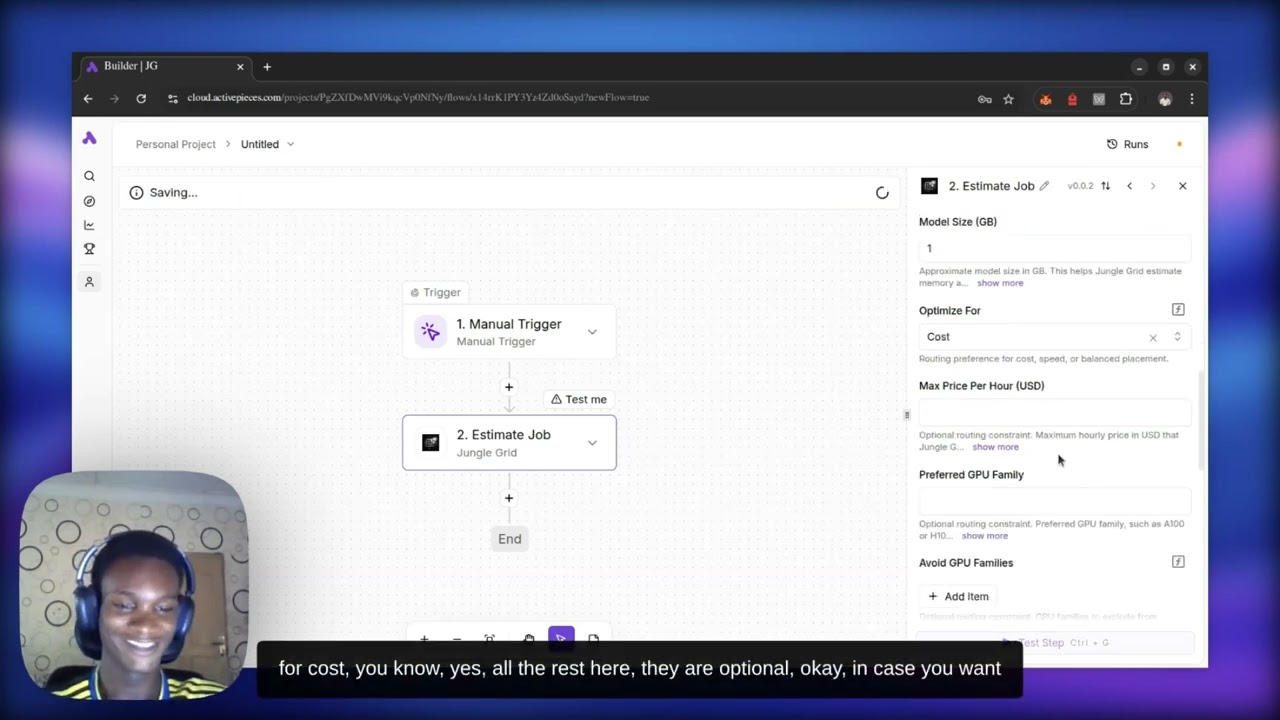
Recorded integration proof: a real Activepieces workflow triggered a Jungle Grid Ready Path and reached a completed job result in 31 seconds.
Activepieces
Low-code automation, event triggers, data movement, and downstream workflow actions.
Remote execution
Remote execution layer for Ready Paths, placement, runtime tracking, logs, and results.
Low-code and event-driven workflows that need tracked AI execution without manual GPU setup.
Open Activepieces docsActivepieces stays in charge of orchestration
Activepieces handles automation flow and downstream actions. Jungle Grid handles remote AI workload execution.
Keep workflow state, app behavior, and orchestration inside the integration tool. Use Jungle Grid when the job itself should run remotely with tracked status, logs, and results.
Architecture flow
Where Jungle Grid fits in the stack
The boundary is intentionally clean: Activepieces owns the workflow, and Jungle Grid owns the AI job lifecycle behind the Ready Path.
Activepieces trigger
A manual, scheduled, webhook, or app event starts the automation flow.
Jungle Grid Ready Path
The flow calls a defined Jungle Grid workload path instead of hand-configuring GPU infrastructure.
Job execution
Jungle Grid places and runs the AI workload on matched remote capacity.
Status check
Activepieces checks the job state while Jungle Grid remains responsible for runtime tracking.
Runtime result
The flow retrieves runtime information and continues once the job reaches its completed result.
Example workflow
Workflow trigger to completed result in 31 seconds
The recorded demo shows a concrete Activepieces flow calling Jungle Grid Ready Paths, checking state, and returning a completed workload without manual GPU setup.
An Activepieces workflow starts from a trigger.
The flow calls a Jungle Grid Ready Path for the defined AI workload.
Jungle Grid submits and executes the job while tracking lifecycle state.
Activepieces checks job status and retrieves runtime information from Jungle Grid.
The demo displays the final status as completed in 31 seconds.
Code example
Submit a workload and track the job
This example represents the same boundary used by an Activepieces action: call Jungle Grid with workload intent, keep the job ID, then check state and runtime information from the workflow.
The important split is the same on every page: the integration tool decides when work should run, and Jungle Grid executes the workload remotely.
In this demo, /api/junglegrid/jobs is an app-side route or helper endpoint that forwards work to Jungle Grid. It is shown as integration glue code, not as a claim about a fixed official URL path.
The kind of job Jungle Grid should execute, such as inference, training, fine-tuning, or a batch run.
A rough sizing hint so Jungle Grid can match the workload to healthy capacity without manual GPU selection.
The container image Jungle Grid should launch for the workload.
The command executed inside the container when the job starts.
Use cases
Good fits for this pattern
This pattern is strongest when developers want to keep workflow logic inside the integration tool and avoid manually choosing GPUs, providers, or regions for each job.
Low-code automations that need to trigger real AI execution without asking operators to choose GPUs.
Event-driven workflows that need status tracking, logs, runtime data, and completed results as workflow state.
Internal operations flows where Activepieces coordinates systems and Jungle Grid runs the workload.
Copy for LLM
Prompt an LLM with the right layer split
This prompt keeps Activepieces in the orchestration role and Jungle Grid in the execution role so generated demos follow the intended architecture.
Prompt template for Activepieces demos
Use this prompt when you want an LLM to scaffold a reference integration without collapsing orchestration into the execution layer.
Build an Activepieces workflow demo that triggers a Jungle Grid Ready Path, stores the returned job ID, checks job status, retrieves runtime information, and shows the workload completed in 31 seconds. Keep Activepieces responsible for workflow automation and Jungle Grid responsible for AI workload execution, placement, logs, and results.FAQ
Frequently asked
Does Activepieces run the AI workload itself?
No. Activepieces owns the automation flow, triggers, data movement, and downstream actions. Jungle Grid owns the AI workload execution, placement, runtime tracking, logs, and results.
What does Ready Paths add to an Activepieces workflow?
Ready Paths lets the workflow call a defined Jungle Grid workload path without manually provisioning GPU infrastructure or choosing specific providers and GPUs inside the flow.
Did the workload execute in 146ms?
No. The Submit Job action response was 146ms. The full recorded workflow reached a completed job result in 31 seconds.
Next step
Let Activepieces automate and Jungle Grid execute
Use Activepieces for triggers, data movement, and downstream actions while Jungle Grid Ready Paths run the real AI workload with tracked status, runtime data, logs, and results.